SolveTap · Learn the method
Homework Solver From a Picture — Upload, Solve, Understand
Capture a homework screenshot or upload a clear photo in a SolveTap Chrome extension. Learn how to include diagrams, labels and data tables.
Capture the question without retyping it
Open the homework in desktop Chrome, capture the problem region with the appropriate SolveTap extension, or upload a picture through the extension. This page explains that workflow; it is not an image-upload form.
Include the written question and every relevant label. A close crop is useful only if it preserves the information needed to solve the problem.
Three examples of useful captures
A geometry diagram
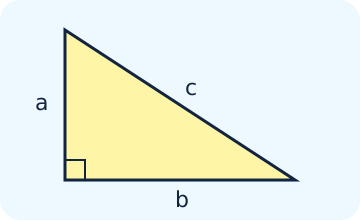
For legs 3 and 4, capture the right-angle marker and the request for the missing side. Those givens justify c = √(3² + 4²) = 5. Without the right-angle condition, that equation is not justified.
A physics diagram
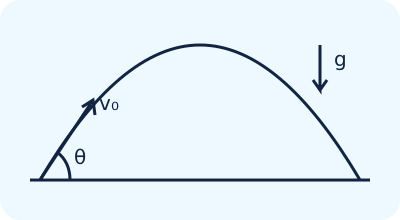
Capture the launch speed, angle, starting height and any statement about air resistance. A projectile question with a platform height cannot use the ground-to-ground range shortcut unchanged.
A statistics table
| Observation | Value |
|---|---|
| 1 | 2 |
| 2 | 4 |
| 3 | 6 |
Include column headings and whether the question asks for sample or population SD. Here the mean is 4 and squared deviations total 8; sample SD is √(8/2) = 2, while population SD is √(8/3) ≈ 1.633.
These are educational illustrations, not screenshots of the extension interface.
Image understanding still needs a check
Image solving combines reading characters with interpreting relationships such as diagram labels and table columns. OCR-like text recognition can confuse a minus sign, decimal point or exponent; a diagram can also be misinterpreted. Check the transcribed givens before trusting a calculation.
- Use a sharp, well-lit photo with the page facing the camera.
- Keep units, answer instructions and graph axes in the crop.
- Remove names, account details and unrelated material.
- If the interpretation is wrong, supply the missing label or type a correction before continuing.
When to use a calculator instead
If you already know the formula and numbers, a free calculator with steps gives a deterministic check. Use the subject extension when you need help setting up a proof, selecting an equation or interpreting a statistical procedure.
Choose your subject extension
Related workflows
- Free AI Homework Solver With Step-by-Step Explanations
Use SolveTap’s subject-specific Chrome extensions to capture geometry, physics and statistics homework and work through the explanation.
- Homework Solver Chrome Extensions for Screenshots and Steps
Install a subject-specific SolveTap Chrome extension, capture a homework problem, read the steps and ask follow-up questions.
Try a free calculator · Geometry resources · Physics resources · Statistics resources
Learn from worked guides
- Coordinate Geometry Problems: Which Formula Should I Use?
Solve coordinate geometry problems with slope, distance, midpoint, line equations and intersections, then prove rectangles and rhombuses step by step.
- Kinematics Equations: Which One to Use and When
Choose the right kinematics equation from the variables you know, then follow worked constant-acceleration examples with signs, units and checks.
- Standard Deviation Step by Step (With Real Data)
Calculate standard deviation by hand in six steps with contextual data, and learn exactly when to divide by N or n−1.